Categorías
IA

Cómo usar los JSON para crear imágenes en IA

Cómo saben, las inteligencias artificiales necesitan de instrucciones (prompts) para que funcionen, pero para que funcionen mejor, necesitan de JSON.

Cómo saben, las inteligencias artificiales necesitan de instrucciones (prompts) para que funcionen, pero para que funcionen mejor, necesitan de JSON.

¿Qué es un JSON?

Imagina que el JSON (JavaScript Object Notation) es como un formulario estandarizado o una ficha de identificación para la información.

Para una Inteligencia Artificial, leer un texto normal es como leer una novela: tiene que interpretar el contexto, la gramática y el tono. En cambio, leer un JSON es como leer una hoja de excel o una base de datos: va directo al grano.

Aquí te lo explico con un ejemplo sencillo:

Texto vs. JSON

La forma humana (Texto normal):

«Hola, mi nombre es Moisés, soy Trafficker Digital y vivo en Perú.»

Para entender esto, la IA tiene que «leer» toda la frase y separar las palabras clave.

La forma para la IA (JSON):
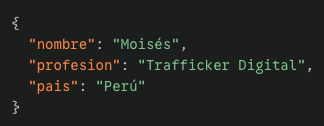
Es una instrucción estructurada, que la IA la puede comprender mejor, sabe que mi nombre es Moisés, la profesión y el país, por eso al usar JSON, los resultados son más exactos.

Ejemplos de JSON:
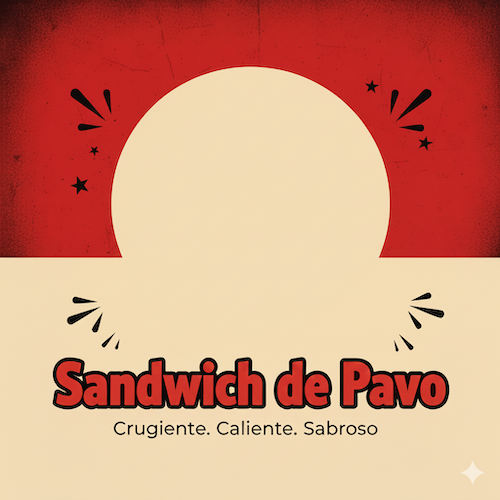
Cómo puedes ver en la imagen de arriba, es un diseño de

VER JSON
{
  «user_prompt»: {
    «main_subject»: Empty space for put a Sandwich,
    «primary_text»: «Sandwich de Pavo»,
    «tagline_text»: «Crugiente. Caliente. Sabroso.»
  },

  «settings»: {
    «aspect_ratio»: «4:5»
  },

  «style»: {
    «overall_vibe»: «bold, high-energy, urban fast-food poster with playful cartoon typography»,
    

    «background_style»: {
      «top_section»: {
        «color»: «deep textured red»,
        «texture»: «grunge, distressed, rough paint texture»
      },
      «bottom_section»: {
        «color»: «warm cream or light beige»,
        «transition»: «hard horizontal split between red and cream»
      }
    },

    «subject_style»: {
      «type»: «centered cut-out of the main food or object»,
      «lighting»: «dramatic directional lighting with high contrast, mouthwatering detail»,
      «edges»: «clean cut-out with slight shadow for depth»
    },

    «typography»: {
      «primary_text»: {
        «font_vibe»: «chunky cartoon-like lettering with black outline and bold fill»,
        «fill_color»: «red or matching vibrant tone»,
        «placement»: «centered below the main subject»,
        «scale»: «large and attention-grabbing»
      },
      «secondary_text»: {
        «font_vibe»: «simple clean sans-serif»,
        «placement»: «beneath primary text»,
        «style»: «small, subtle, spaced-out»
      }
    },

    «graphic_elements»: {
      «doodles»: «optional black hand-drawn marks or exclamation lines near the subject»,
      «integration»: «should feel energetic and fun»
    },

    «color_palette»: {
      «primary»: «bold reds, blacks, creams»,
      «accent»: «warm highlights, slight golden tones for food»
    },

    «composition»: {
      «balance»: «hero subject in center, strong upper/lower color division»,
      «focus»: «subject should feel large, dominant, appetizing»
    }
  }
}

El prompt de arriba fue hecho con un json para mostrar las características de un iPhone 17, puedes cambiarlo por el producto que quieras o puedes dejarlo en Empty (vacío) para que puedas colocar cualquier producto allí.
VER JSON
{
  «user_prompt»: {
    «center_image_description»: Empty space,
    «title_text»: «iPhone 17»,
    «text_theme_description»: «Características reales del iPhone 17 en español»
  },

  «settings»: {
    «aspect_ratio»: «4:5»,
    «auto_generate_text_items»: true,
    «number_of_generated_items»: 10
  },

  «style»: {
    «overall_vibe»: «cozy, handwritten, diary-style aesthetic on grid notebook paper, with doodles and handwritten notes scattered around a central cut-out portrait»,

    «background»: {
      «type»: «light grid paper»,
      «texture»: «soft, minimal, notebook-style»
    },

    «center_image»: {
      «placement»: «centered»,
      «style»: «cut-out portrait with soft shadow»,
      «border»: «subtle white outline for separation»
    },

    «title_style»: {
      «font_vibe»: «handwritten cursive or brush pen»,
      «size»: «large»,
      «color»: «black»,
      «placement»: «top center»,
      «extra_accents»: «small red doodle marks around the title»
    },

    «generated_text_items_style»: {
      «font_vibe»: «handwritten casual print, black ink»,
      «distribution»: «scattered naturally around all sides of the center image»,
      «spacing»: «varied, organic»,
      «line_accents»: «red underline, circles, arrows, stars, asterisks»,
      «tone»: «friendly, personal, diary-like phrasing»,
      «length_per_item»: «short phrases or one short sentence each»
    },

    «doodles»: {
      «colors»: «red and black»,
      «types»: [
        «arrows»,
        «spark lines»,
        «underlines»,
        «circles»,
        «asterisks»,
        «stars»
      ],
      «placement»: «mixed between text items to create a dynamic scrapbook look»
    },

    «color_palette»: {
      «primary»: «black ink»,
      «accent»: «bright red marker»,
      «background»: «off-white with grid lines»
    },

    «composition»: {
      «balance»: «central focus with text evenly spaced around the subject»,
      «style»: «casual, scrapbook-like, playful but clean»
    }
  }
}

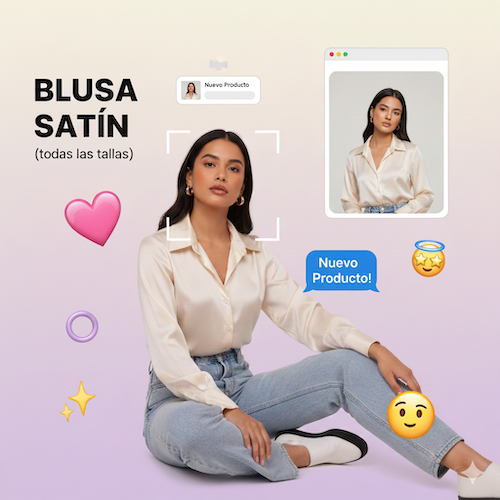
Gracias a Nano Banana, puedes crear imágenes de tus productos como el de arriba, que es una blusa satín, a continuación te muestro el prompt.

VER JSON
{
  «user_prompt»: {
    «scene_description»: ,
    «overlay_text»: «BLUSA SATÍN (todas las tallas), Nuevo Producto! (in chat bubble)»
  },

  «settings»: {
    «aspect_ratio»: «4:5»
  },

  «style»: {
    «overall_vibe»: «Y2K Gen Z digital collage, playful, social media interface aesthetic, pastel pop nostalgia»,
    «subject_style»: {
      «outline»: «No harsh outline, but integrated into a layered digital collage»,
      «pose_vibe»: «Cool, confident, candid studio pose sitting on the floor»
    },
    «background_style»: {
      «type»: «Soft pastel gradient transitioning from creamy off-white to light purple/pink»,
      «lighting»: «Flattering soft studio lighting on subject mixed with digital glow»
    },
    «text_style»: {
      «placement»: «Large, bold, black sans-serif headline in upper left. Chat bubble text near subject. Notification popup text.»,
      «font_vibe»: «Modern bold sans-serif for main header. iOS system font style for UI elements.»,
      «extra_elements»: «Blue iMessage-style chat bubble, AirDrop notification popup window, mock browser window frame with another photo»
    },
    «illustrative_elements»: {
      «doodles»: «Various 3D glossy emojis (sparkles, pink heart, star-eyes, halo ring, side-eye), white camera focus bracket lines»,
      «integration»: «Floating digital stickers and UI elements layered around and over the subject in a scrapbook manner»
    },
    «color_palette»: {
      «tones»: «Pastel pinks, lilacs, creams, electric blue accents, bright yellow emoji accents»,
      «contrast»: «Soft, bright, and playful contrast»
    },
    «composition»: {
      «framing»: «Central subject anchored on the floor, surrounded by a busy arrangement of floating UI elements and emojis»,
      «depth»: «Layered digital depth with elements popping forward from the gradient background»
    }
  }
}

Si quieres ver la lista completa de json debe llenar el siguiente formulario para enviártelo.

<

p data-path-to-node=»7″> LISTA COMPLETA